Q:
Can I add my own HTML codes to my profile page?
A: Yes. We are now giving our customers
the option to put HTML codes in place of their description. We want
to give you the freedom to make changes without having to go through
us. With this service you can imprint your ToyDirectory.com profile
page with your company's own unique style.
If you wish to have part of your home page displayed on your profile
page, simply send us your HTML code. We will then add it to your profile
page. You can add images, java, or even flash to your profile
page. Simply follow the guidelines below for sending HTML codes.
Image
Update Guidelines:
1. Send us a complete HTML page ("yourpage.htm"). A complete
page will contain all the information we need so that your page can
be uploaded as soon as possible.
2. Images
must be linked with their full path or they will not show up on your
profile page.
Incorrect:<img
src="yourimage.jpg">
Correct: <img src="https://www.yourwebsite.com/yourimage.jpg">
3. Please
limit your code to 1,500 characters, or 10 paragraphs (3 - 4 lines each).
4. Read
this FAQ to get tips on creating and updating your profile page images.
5. Please
have your web master or web designer consult us for additional information.
Q:
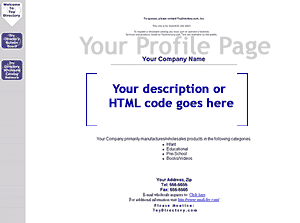
Where will the HTML code be located on my profile page?
A: Your HTML code will be located
exactly where your company description would go. As it replaces your
company description it is suggested that you add any description
info you would like into your code.
To
u
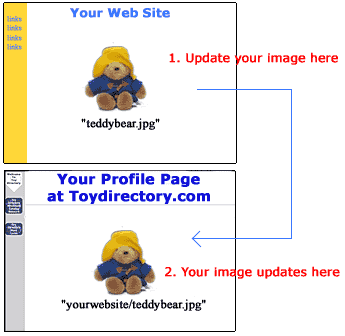
Q: How do I update the images on my profile page?
A: Your images are stored on
your website. If you want to change the "teddybear.jpg"
image on your profile page you need to have your webmaster or web designer
update the "teddybear.jpg" image on your site.
*Note: Be careful when working with your images. If you change an image
on your website, the same image with be changed on your profile page.
Q:
How do I update text on my ToyDirectory profile page?
A: To be able to update text by
yourself, you must insert the text into an image which is located
on your site. Regular Text updates still must be done through ToyDirectory.
Simply email your text changes to update@toydirectory.com.
Remember you have a limited number of text updates per year. An example
is shown below:
| Text
inside of an image: |
Regular
text: |
 |
Our
hot new item this month is Digimon cards! Visit our web site
and receive a 20% discount! |
Q:
What If I want to change the entire layout of my HTML code?
A: In the event that you would like
to completely change the layout of the code you sent us, you will need
to resend a complete HTML page to update@toydirectory.com.











